as a former yearbook editor and designer, let me explain this further
if youre only planning on posting your art online, them please save it as .png ;this is also better for transparencies as well
BUT
please, if youre planning of printing your art, NEVER use png. it makes the quality of the image pretty shitty. use jpeg or pdf instead. and always set your work at 300dpi to get a better printing quality – this means, the images are crisper and sharper and theres no slight blurriness. i had a talk with my friend who is currently taking design, and pdf is much better to use when youre working with a bigger publishing company because it still has the layers intact, but if youre only planning on printing your stuff at staples or at some small publishing store, the jpeg is the way to go.
hey!! sorry to hijack this post, but there are a bunch of ways you can make videogames without knowing shit about computers!!
for starters, there’s Twine, which is fucking great for making all kinds of interactive experiences (it’s what Crystal Warrior Ke$ha was made in so you KNOW it’s good) at all skill levels (i picked it up and made a game in two minutes a few nights ago)
if you want a bit more involved experience there’s Inform 7 which is a simple language for text-based adventure games that reads like slightly-weird English and also relatively easy to learn
you can do some pretty fucking cool stuff with Unity (my personal engine of choice) but you may need to dig a bit farther to get at the good stuff. there’s lots of really good presets though (i made an entire game just mixing and matching pre-existing templates and adding in my own art, won an award at a game jam for that one) and if you want help the community’s pretty dang friendly from what i’ve seen!
this is just a taste of what’s out there from what i’ve seen, but there’s so many cool resources out there. if anyone wants help getting started, i’m around to give you a leg up on making something in the coolest, most unexplored art medium around!
I’m addin’ to this post because lowering the barrier to entry for making games is super important to me!!!! If y’all have any questions about making games, you’re welcome to come and ask! I made this list a while back with some friends, so it has some of the programs John already mentioned.
2D Editors:
GameMaker : Potential for pure drag-and-drop “programming”. It is recommended to read-up on the program’s functions to make good use of it. Good for prototyping. Uses its own language called Game Maker Language (GML) that is similar to a C language (e.g. C++ or C#). For both Mac and PC; free version available.
Construct2 : Drag and drop level editor that uses an “If-Then” event sheet structure for programming. Good for prototyping and for beginners. For PC; free version available.
GameSalad : Drag and drop with no code requirement. Good for programming. For both Mac and PC; free version available.
Solpeo : HTML5 based game engine for 2D and isometric game development. Some programming knowledge needed. Platforms supported: Chrome, Firefox, Internet Explorer 9+. Free version available.
Stencyl : Drag and Drop “programming,” templates you can edit the variables/values for.
Scratch : Lego-block-style coding platform by MIT; totally free and a great intro to thinking in code. Very kid-friendly and comes with a community site. Browser version available.
3D Editors:
Unity : 3D editor that creates 3D games. Can build games for browser, as an app, or for mobile devices (iOS and Android). For both Mac and PC; free version available.
UDK (Unreal Development Kit) : Full-fledged, highly advanced editor. Features a complete set of tools that go from level design to visual scripting to cut-scene creation. Uses it’s own programming language called Unreal Script that can be arranged with Kismet, a visual code editor. For Mac and PC; free.
2D Art/Animation Software:
GIMP : Free photo editing and digital painting software.
Easy Paint Tool SAI : Free digital painting software with a UI similar to Photoshop.
Mischief : Free digital painting software with an endless canvas.
3D Art/Animation Software:
Sculptris : From the company that created Zbrush, this free software is ideal for beginning 3D sculptors.
Maya : Animation, VFX, lighting, and rendering software.
Magical Voxel : Voxel Art (3D Pixel Art). Very intuitive and quick to pick up.
SketchUp : Architectural modeling software, great for creating 3D environments and buildings. Free version available.
Text-Based Games:
Twine : Create interactive text stories using Twine’s visual map system that links your game together. Easy to learn and use. End result is browser-based. For Mac and PC; free.
Quest : Interactive text stories that you can build in-browser.
Ren’Py : Create visual novels using a modified version of Python that reads like a combination of stage directions and a CYOA novel. For PC, Mac, and Linux; free.
Audio Resources/Editors:
Indie Game Music : This site offers free indie music with no need to worry about royalties or licenses.
Audacity : A free, open-source, cross-platform sound editor that allows you to record and arrange sound.
Super Flash Bros. : This site allows you to record theremin-like (8bit) sounds and export them as .wav files for your games.
These gloves work wonders for my long-haired German Shepherd puppy. My puppy is 11 months old and sheds like crazy. The gloves are perfect because my puppy does not like being brushed by those rough brushes and tries to bite them. With the gloves she doesn’t care as much.
Ok so I’ve covered why you should not actually clone your pet. But to be honest, I’m not sure how many of you were actually considering dropping 50 G’s for the procedure. Still, maybe you want some sort of memory of a pet who passed away. So let me tell you about CUDDLE CLONES
Basically it’s this company that will make a PLUSH replica of your pet. A cat, dog or horse is $249, and smaller animals like rabbits and guinea pigs are $179.
In addition to being much cheaper than actual cloning, it doesn’t require any invasive surgery on innocent surrogate ovum donors and mom dogs! Note that this isn’t the only company that does something like plush replicas, for example Feltpets will make your animal out of felt.
But OK Cuddle Clones look particularly quality to me, look at how close they look to the original
they also do figurines
Furthermore, they’ll do any animal you like
cat? dog? horse? gerbil? donkey? it don’t matter to cuddle clones, they will MAKE YOU THAT PLUSH
Also, they donate money to animal-related charities Did I mention they will do any animal? it doesn’t even have to be real. it can be the fursona you made when you were 14 for deviantart
hell, they’ll make your How to Train Your Dragon OC if you want it
Cuddle Clones is there for you, and i need one of my blob monster please
W
That might actually be really helpful for some people.
I have checked the site to see what other animals they have done, and they have made many birds, fish, and turtles before! In case anybody had any worries on what animals they’ll do.
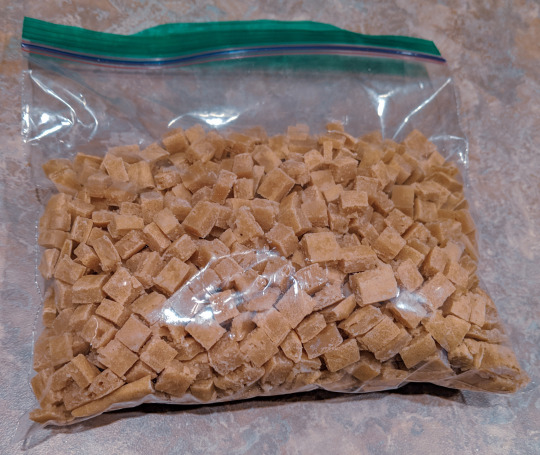
Around 800 high value training treats for the price of one can of tuna, an egg, and a cup of flour?
WHY HAVE I NOT MADE TUNA FUDGE BEFORE NOW?
How do you make these please???
I did one cup tuna, not drained. One cup flour. One large egg. Blend it into a dough, spread it as thick as you want the treats on a parchment lined or greased baking sheet, and pop it in the oven at 250F for 30 minutes. Cut into the size pieces you want.
This is brilliant, thank you so much!
Seems like a good high protein treat for chickens too!
i told ya we’ve canceled discourse n we’ve moved on to homesteading skills
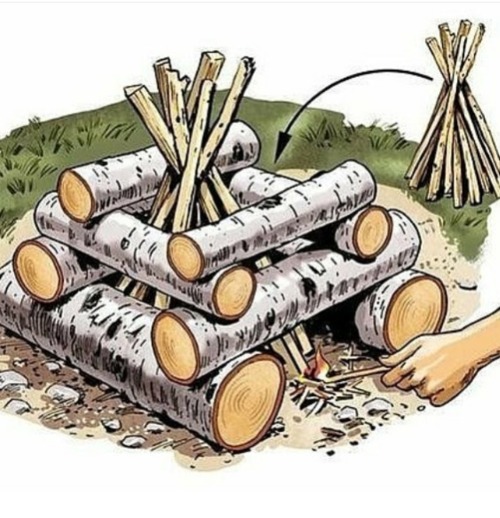
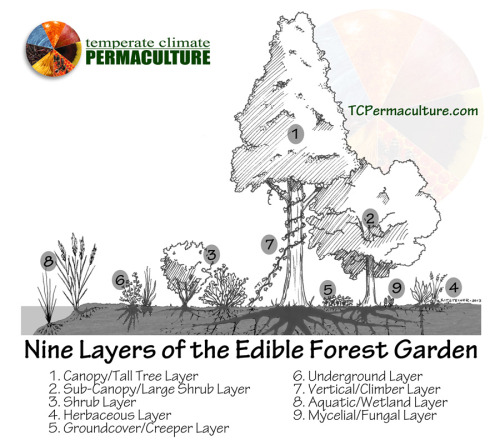
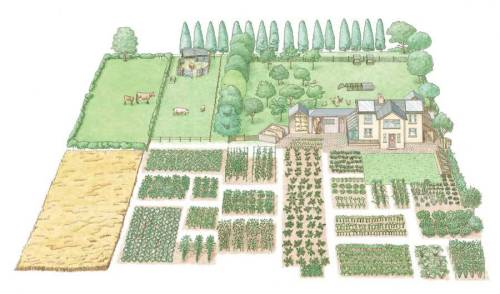
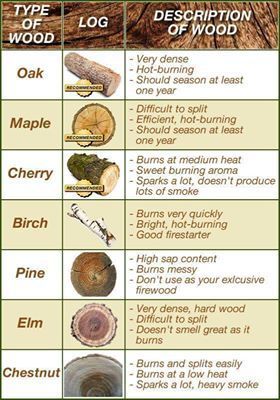
it’s just choppin wood and harvesting vegetables and herbs from here on out
amen!
unironically this
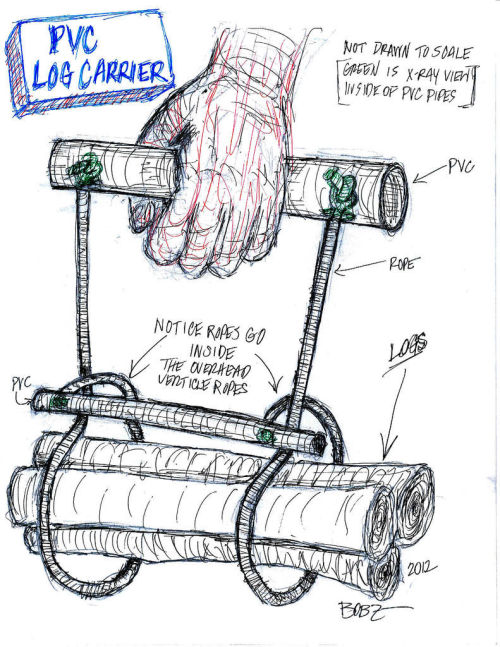
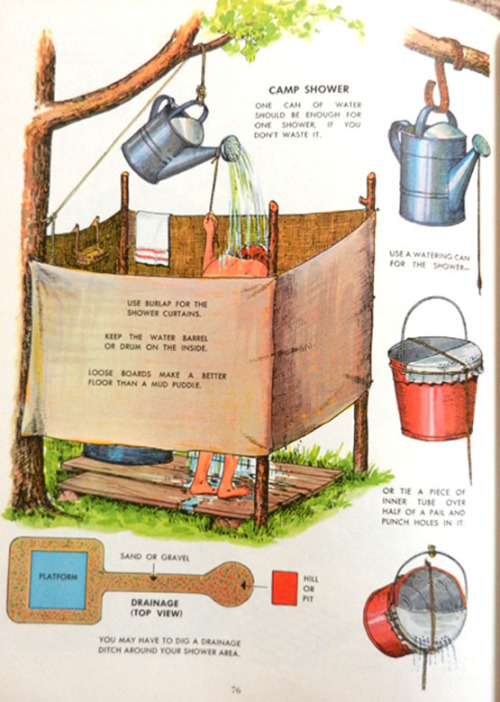
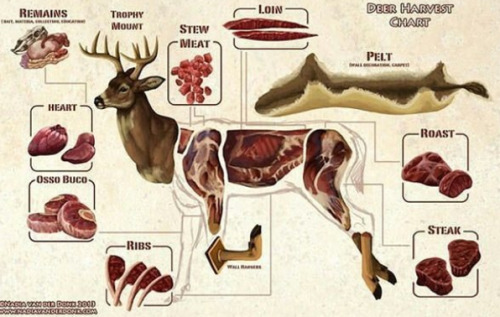
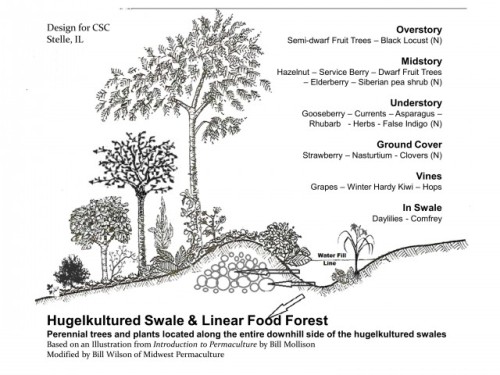
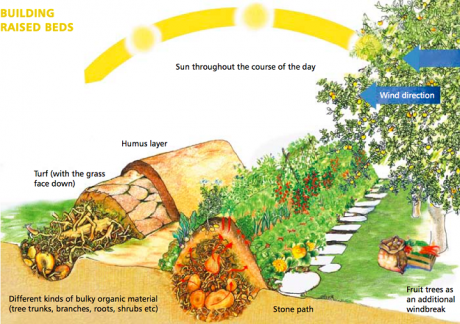
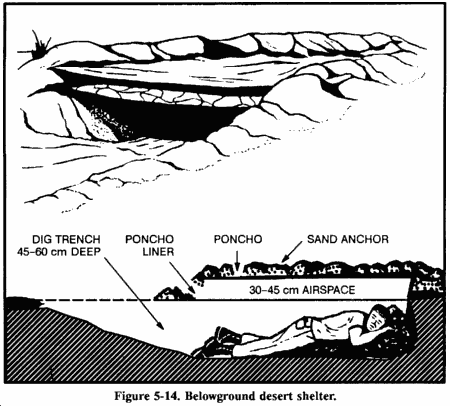
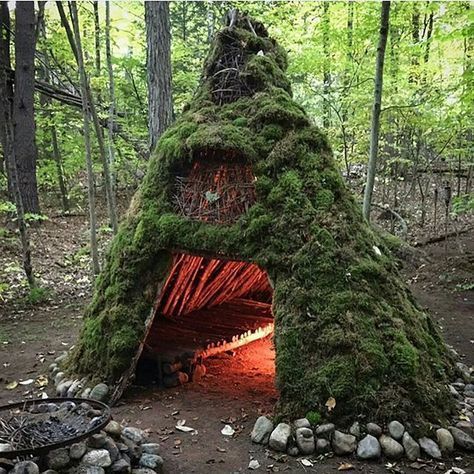
Please hit me with more homesteading concept drawings
Good reference material here.
My brain during sane hours of the day: “I have a good job with benefits, a stable social network with supportive friends and family, and I’m a nerd who thrives on advanced technology. Also, I dislike the taste of fish.”
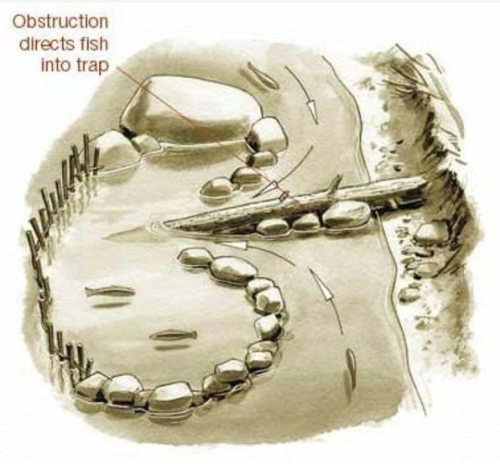
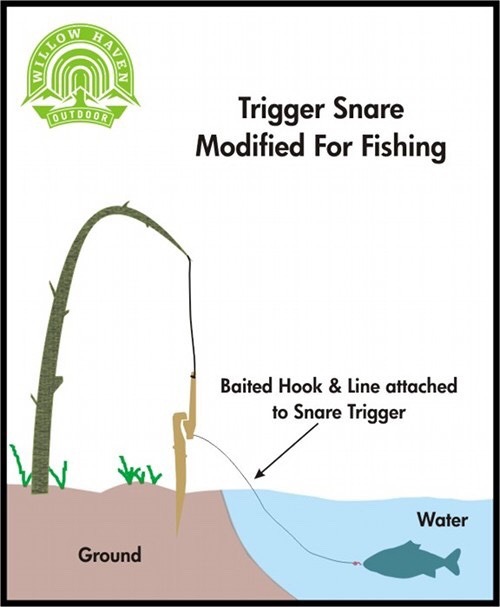
My brain on Tumblr at 3:30am: “Y’know, abandoning all technology and leaving civilization behind looks like a lot of fun! And I could teach the kids how to build a fish trap!”

















































































 ifesbob


